Overview
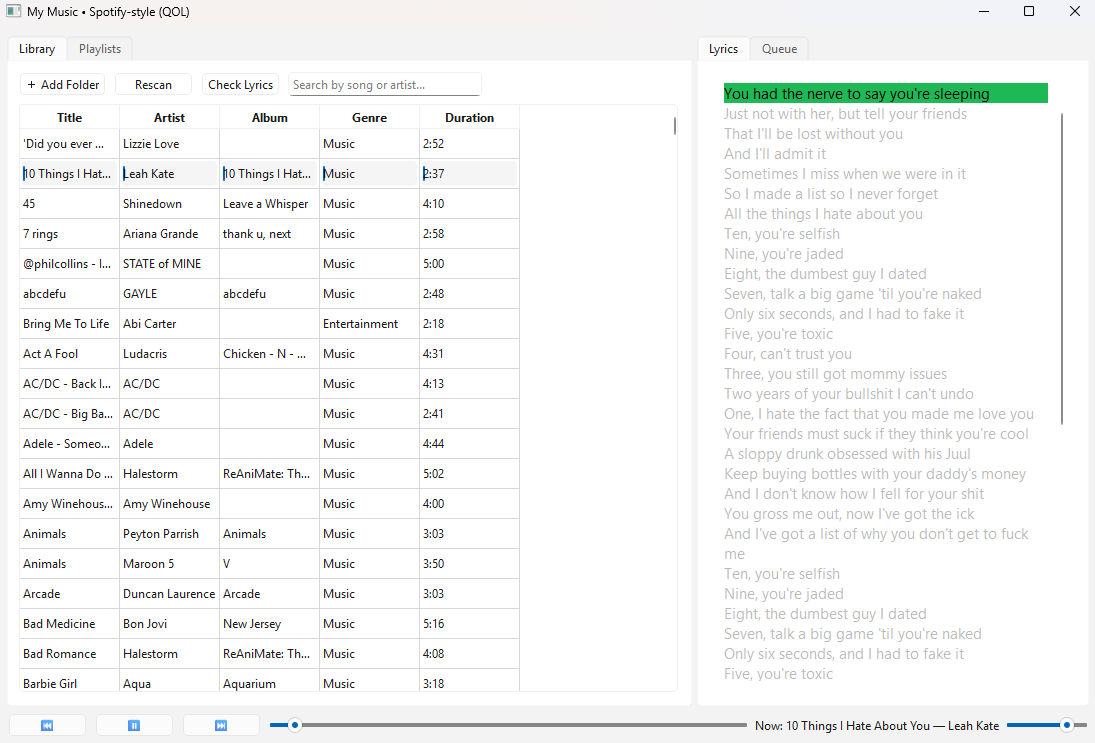
I created a complete music player that does what Spotify does, but for your local library. Real-time synced lyrics, genre-based discovery, personalized recommendations, and custom playlists — all running locally without paying a subscription.
This was built in close collaboration with ChatGPT, where I handled product direction and iterative refinement while ChatGPT provided the architecture and implementation.
What I Built
The Problem
Spotify locks you into their catalog. Bandcamp albums you bought. Vinyl rips on your hard drive. Local files you created. All stuck in folders, unplayable in a real music app experience.
My Solution
A desktop music player that:
- Plays local files from your computer
- Syncs lyrics in real-time — highlights the current line as it plays
- Recommends songs based on what you actually listen to
- Auto-tags genres and lets you browse by category
- Manages playlists — create, edit, reorder with ease
Key Features
Real-Time Synced Lyrics: I directed ChatGPT to implement lyrics downloading and line-by-line synchronisation. As the song plays, the lyrics highlight the current line in real time. It’s polished and feels premium.
Smart Recommendations: The app analyzes your listening history (which songs you play most, how many times) and suggests similar tracks from your library. It’s not a black box — it’s based on YOUR listening behavior.
Genre Auto-Tagging: Instead of manually tagging 500 songs, the app uses metadata from your audio files to automatically categorise music. You get instant genre-based browsing.
Custom Playlists: Create playlists, reorder them, see them update in real-time. Full CRUD operations without complexity.
Threading for Responsiveness: I insisted on background loading of metadata and lyrics. While you’re browsing, the app fetches data in the background — no frozen UI.
The Collaboration
My Role:
- Defined the feature set and user experience
- Decided what “premium” means (real-time lyrics, recommendations that work)
- Iterated on the UI and functionality
- Directed ChatGPT toward better approaches
- Tested edge cases and requested refinements
ChatGPT’s Role:
- Built the music playback engine
- Implemented the lyrics fetching and synchronisation system
- Designed the recommendation algorithm
- Architected the threading system
- Wrote the playlist management logic
This demonstrates strategic AI use — I didn’t build it alone, but I shaped every decision about what it should do and how it should feel.
Technical Highlights
Lyrics Synchronisation: The hardest part. Fetches lyrics from an API, parses timestamps, and highlights the current line as playback progresses. Requires precise timing synchronisation.
Recommendation Algorithm: Tracks your listening history (play counts, frequency) and suggests songs with similar metadata (artist, genre, era). Simple but effective.
Threaded Loading: Metadata and lyrics load on background threads. Playback never stalls.
Playlist Persistence: Playlists saved to JSON so they survive app restarts.
Why This Matters
This project shows:
- Product vision — I could articulate what “great” looks like
- AI collaboration — effective direction and iteration with an AI tool
- UX thinking — features are designed for the user, not just technically possible
- Full-featured application — not a prototype, a real, usable app
- User-centric design — recommendations based on your data, not generic algorithms
Tech Stack
Python · threading · JSON · urllib · dataclasses · OS
Built in collaboration with ChatGPT. Product vision and direction by me, implementation by ChatGPT.