Overview
I built a polished desktop video player that transforms how you browse a local video collection. Instead of raw folder navigation, Local-Flix presents movies and series in a Netflix-style interface with live metadata, cover art, and genre filtering — all pulled automatically from TMDB.
This was built in close collaboration with ChatGPT, where I handled the vision, direction, and refinement while ChatGPT provided the architecture and implementation.
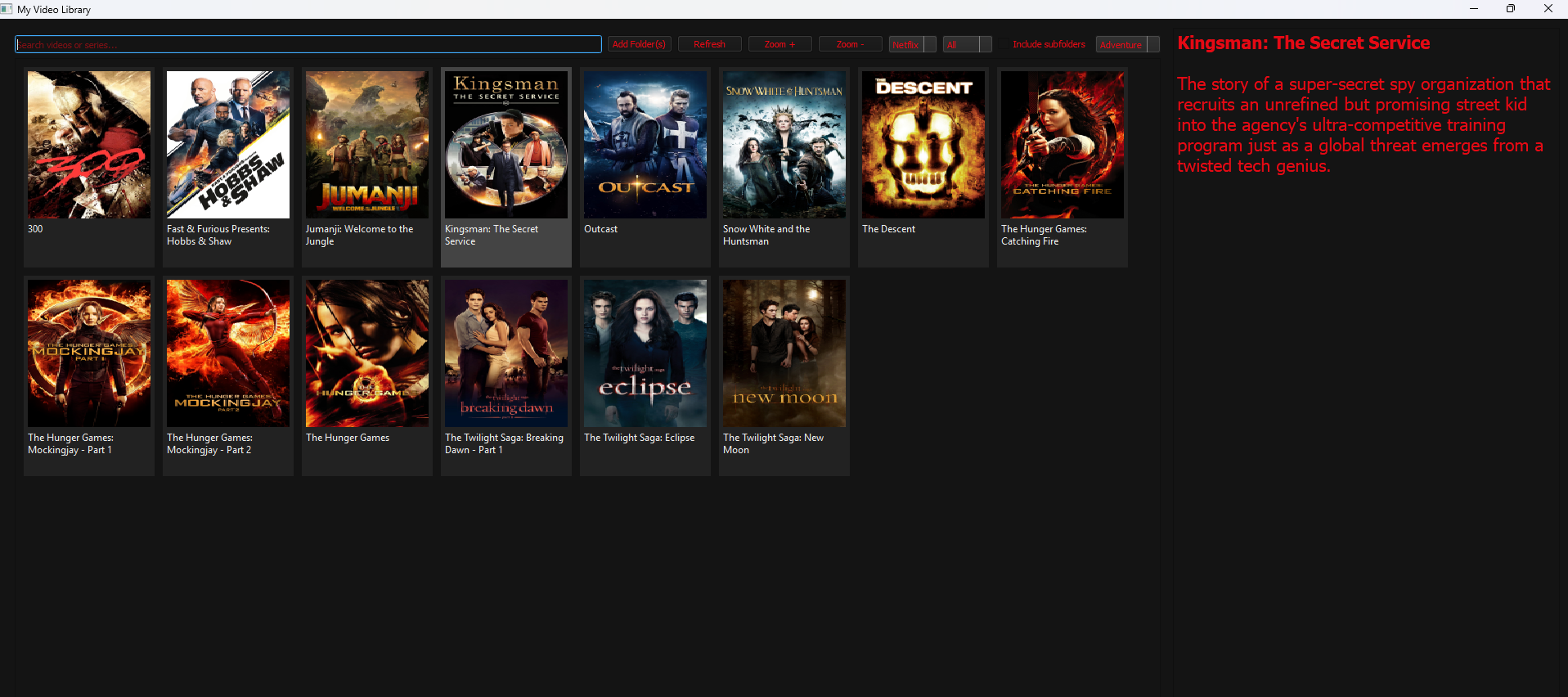
What I Built
The Problem
Local video collections are scattered across folders with no metadata. Playing a film requires hunting through directories. There’s no browsing experience, no discovery, no polish.
My Solution
A desktop app that:
- Scans your local library
- Auto-fetches cover art, plot summaries, genres from TMDB
- Displays everything in a Netflix-style grid
- Filters by genre, media type (movie vs. series)
- Plays videos with seamless integration
Key Features
Intelligent Metadata Loading: I directed Claude to implement threaded background loading so the UI never freezes while fetching data from TMDB. You see the app respond instantly while metadata streams in.
Genre Filtering & Sorting: Instead of browsing 100 titles, filter by genre instantly. The app pulls real genre tags from TMDB, not guesses.
Local Playback: PyQt5’s media integration handles playback. No external player needed.
Responsive Design: The UI stays snappy because heavy operations (API calls, image loading) happen on separate threads.
The Collaboration
My Role:
- Defined the feature set and user experience
- Iterated on the design (feedback on layout, colors, usability)
- Directed ChatGPT toward specific implementations
- Tested functionality and requested refinements
ChatGPT’s Role:
- Architected the PyQt5 application structure
- Implemented TMDB API integration
- Built the threading system for responsive loading
- Wrote image fetching and caching logic
This demonstrates effective AI collaboration — not having the AI do everything, but using it as a tool to accelerate development while maintaining creative direction.
Technical Highlights
API Integration:
Uses tmdbv3api to fetch real movie/series metadata. The app handles failures gracefully — if TMDB is down, the app still works (just without metadata).
Threading: Metadata loading happens on background threads. Your clicks are never delayed by network requests.
Caching: Downloaded images are cached locally so the app doesn’t re-fetch the same poster 10 times.
Why This Matters
This project demonstrates:
- AI collaboration skills — working with AI to build polished applications
- Product thinking — I could define what “good” looks like and direct toward it
- Technical judgment — I knew when ChatGPT’s solution was right and when to push back
- Full-stack thinking — APIs, threading, UI, playback all integrated
Tech Stack
Python · PyQt5 · tmdbv3api · requests · threading · JSON
Built in collaboration with ChatGPT AI. Code by ChatGPT, vision and direction by me.